26 April 2016

Business in Japan - Cultural Lessons

The March edition of More Magazine had an interesting feature on 'high status' vs 'low status' etiquette in an office environment. Most of it I'd heard before (give and receive a business card with two hands, always allow someone to introduce you etc) but I found this set of diagrams interesting:


It shows where to stand / sit in different situations. The high-status position is marked with a (1), number (2) is second-highest-status etc.

In summary the person furthest away from the entrance (入口 / 出口) is highest in status and the person furthest away is lowest. If you're ever attending a meeting in Japan remembering that will probably be enough but here are some other nuances:

  • In the top left diagram position number 5 is furthest away from the table as well as closest to the entrance.
  • In the top middle diagram position number 4 is closest to the lift/elevator buttons.
  • In the diagram on the right position number 4 is riding in the front of the taxi with the driver. As people drive on the left in Japan person 1 would either get into the taxi first or have their own door to enter with.


And that's about it. I haven't bothered translating all of it as it's mostly about entrances and exits but I hope that was useful to you!

10 April 2016

Email redesign

Our weekly email was not displaying well across email clients - so I decided to redesign the whole email template. I've been doing research on layouts for a few months at that point - when I got an email that I thought was clear I would sketch a quick boxy-wireframe of the email message and stick it in a folder.

But when I finally got the go ahead on the redesign it turned out other people really liked the current design so all my plans were foiled.

I read a lot of documentation about designing for email (mostly using the Litmus Blog) and relearnt html tables. In the end it was really satisfying looking at all the nested tables - in the end even with our reasonably simple template we ended up with 13 tables. And then I transferred my template to MailChimp. It's actually easy to make an area editable in MailChimp - you just wrap the bit you want to be editible in a
. There are other things you have to do which MailChimp have listed.


My first design. Different tables are highlighted in different colours
I did miss a few things. That's my fault because I did a lot of research on what's popular in email design and the problems that our users were having but when I decided to remake the current template rather than design a new one I didn't spend enough time looking at the old templates. For example I used #color1 rather than #color2 for the links which I had to go back and fix.

But the new template seems to be working. All the images that were reused (such as the header and social links) have been updated and resized, everything is nested properly and W3 compliant. The colour palette was reduced so everything looks a lot more simple now. More importantly I stripped out lines and lines of header css and moved them inline. The only css in the head now is the link color, image display and some @media queries (which mobiles apparently read but desktop clients don't).

Here's the head of the old template -  see the full email

Here's the head of the new template -  see the full email

To be honest it's a lot more blocky now - I can't really explain it but I assume it's because the width is very fixed. There was also a lot of white space at the bottom of the email so I moved things around to get rid of that scrolling space that I don't think anybody was scrolling through - it was pretty obvious that the email had finished by then so items like our social links and the 'donate' button weren't getting seen.

Designing for email was pretty fun in the end! Once I got into the nested tables drama I found it really satisfying. I didn't have to use a clearfix anywhere! But unfortunately that's the end of that project and now I'm back to working with floats....


2 April 2016

Wireframing is fun!

Even though I haven't done any real training on it I really like wireframing. I liked reading through Google's Material Design principles and figuring out which user interactions would make the most sense.

I wireframe things for fun all the time - it helps me think about the composition and the parts of what I'm doing - but this was my first time using an editor to make it look neat.

I used NinjaMock because I'd heard of it before and it's free for personal use. It took a little getting used to though. At one point I lost all my work because I wanted to add my own assets and then found out you needed an account to add your own assets. But once I was faced with a blank screen again it was very easy to recreate what I had before now that I knew where to go for what I wanted (only having 3 views helps).

I think there was a way to show the interactions using NinjaMock but that was beyond what I needed - I just wanted to show people something that wasn't my notebook.

Original thought process and sketching

View 0 - Home screen

View 1 - Slightly different from the way I sketched it because I talked through the data-structure with the data architect

View 2 - I'm a little worried I'll create something that doesn't work but has really awesome animations


23 March 2016

Basics of social media

Koro Sensei isn't around right now - so you have to learn from me!
I helped put together a presentation introducing other campaign groups to social media. I've removed all TaxPayers' Alliance stats and replaced them with my own, as well as cut down on the number of slides - deleting half of the example slides and the 'how to access these tools' slides.
If you can't see the deck below you can find my SlideShare here. This is the first time I've used SlideShare so let me know if I've done something odd.

9 November 2015

Redcar doesn’t want to lose jobs - but neither does China

Blog for The TaxPayers' Alliance! I've copied the first part here but you can find the full blog here and it was also published in the Yorkshire post here!

------------------------------------

First Redcar and then Tata Steel announced further job cuts in the steel industry. Exactly what is going on and is there a case for the government to intervene using taxpayer cash to prop up the current price of steel or bail out the suffering plants to protect British jobs?

The Steel Industry in the UK

A large motivating factor in the outcry is that the jobs under threat are of national historic importance to the country. During the industrial revolution producing steel was of national importance in order to grow the railways, build machinery and expand.

By 1870 Britain produced 60 times more steel than it had in 1800 and in 1875 Britain produced 40 per cent of the world’s steel. But by 1896, only 20 years later, Britain’s share in the world steel market dropped to 20 per cent. The industrial expansion slowed and so did production of steel.

Then in the post war period the steel industry went through a lot of uncertainty as successive governments nationalised, privatised and re-nationalised the industry. Conflicted objectives and a lack of innovation meant the industry wasn’t free to develop and grow as it liked due to the uncertain climate.

Steel production volume continued to fall and so did exports. Currently Germany ranks 7th in the world for total output, making it the biggest producer in the EU, with Britain ranking as 18th.


2 July 2015

Writing a blog post


So, here's another very quick guide that I wrote for the TPA to accompany my SEO one. Again, I'm not actually an expert by any stretch of the imagination so if you actually want to learn about these things I suggest you use Google. However, here's some basic things that you should keep in mind when writing a blog.


Hey guys, a lot of you seem unsure about how to write a blog? Or your blogs seem more like essays than blogs so here are some general things to keep in mind

Writing a blog with Yui from K-On!


Audience and purpose: Always keep your audience in mind. How much do they know about the subject? If you're unsure, assume an intelligent reader with no prior knowledge of the subject at hand. That means explaining any acronyms, using shorter, clearer sentences and telling a story rather than presenting an argument.

Tone: Conversational and simple. As if you were explaining a concept to a friend of a friend.

Content: Again, keep it simple but interesting. Don't get bogged down by the nuances of the story. Link to a source on another site if you need to. As a guideline length should be around 500 -750 words.

Images: Only use them if they contribute something to the experience of the reader rather than from decoration. In this case centre them on a new line rather than wrapping the text around the image. Make sure you give a detailed descriptions in the image tag.

Example: I quite like Mana's blogs Manchester's £3.5 million black blob of glass and Taxpayers to pay hundreds... so Councillors can learn how to run the Council.

30 May 2015

Cool things I found this month

Unfortunately, I feel like I haven't improved over the past month.... So here are some cool things that I learnt and links that I found instead.

How to commit electoral fraud

I voted in the election this month but I didn't have my polling card and they didn't ask for any ID either. When my mother went to vote with hers they said she had already voted but I hadn't. So there you are, if you want to commit electoral fraud at any point in your life it's very, very simple. You can also just take someone else's polling card and use that. Again, you don't need ID.

Various links

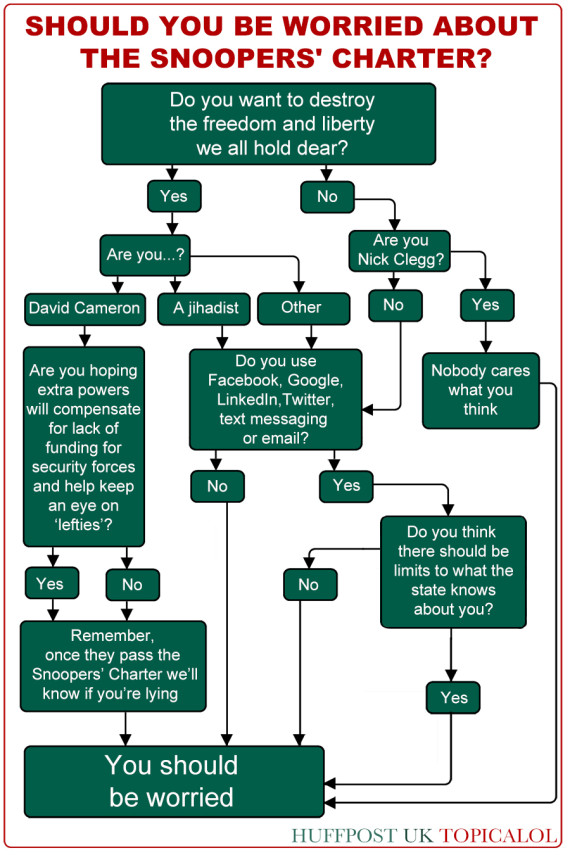
The Snoopers Charter


Video: secure messaging and credible news


If you worry about the security of your messages, try Bleep. It even gets around how people can just screen grab the conversation. You don't need to sign up with an e-mail and the chat is secured. Seriously! It's pretty cool!


Did you know that eating chocolate helps you loose weight? Thank's to a study in Germany we can now eat chocolate and stay healthy! Or can we? As this long article details you can't trust every new study that comes out. I like to think of this as the next dihydrogen monoxide scandal. I bet you'll see people quoting this study for years to come. Thankfully, the internet is forcing us to be sceptical about what we see online and the iO9 article notes that many of those that commented on these 'news stories' asked the questions that the journalists in question should have asked themselves.

The video above is kinda related, it was commissioned by a Brazilian news company to demonstrate why you should get your news from a reputable source. Interesting video and great artwork.

Inspired by the... Sky?

I took some photos of the sky! My finance got in the way. He's pretty cool though so it's okay.